解决办法:
(1)npm install –registry=https://registry.npm.taobao.org –loglevel=silly
(2) npm cache clean –force
(3) npm install
来源:
https://blog.csdn.net/longzhoufeng/article/details/104961342
解决办法:
(1)npm install –registry=https://registry.npm.taobao.org –loglevel=silly
(2) npm cache clean –force
(3) npm install
来源:
https://blog.csdn.net/longzhoufeng/article/details/104961342
服务器启动的时候dns解析失败,host直接绑定域名是一个解决方案,但是这样不太好
Mar 07 17:22:59 wm php-fpm[230837]: [07-Mar-2022 17:22:59] ERROR: failed to open error_log (/usr/local/var/log/php-fpm.log): Read-only file system (30)
当你照着 此文 安装好PHP,并做好systemd服务管理文件,你会发现用systemctl start php-fpm 无法正常启动php-fpm 报了一个很奇怪的错。
ERROR: failed to open error_log (/usr/local/php/var/log/php-fpm.log): Read-only file system (30)
此时,selinux是关闭状态,普通用户对这个文件也可写,问题就迷离了。
解决方法:
打开 /usr/lib/systemd/system/php-fpm.service 把
ProtectSystem=true
改成
ProtectSystem=false
当这个值为true的时候,php-fpm进程将以只读的方式挂载 /usr 目录,这就是问题所在。具体可参考
https://www.freedesktop.org/software/systemd/man/systemd.exec.html#ProtectSystem=
或者修改日志文件路径也可以解决这个问题
经了解,Mysql默认支持的占位符最多为65535(2^16-1)个,写入数据为m列,n行。m*n必须小于65535
需要升级git内核程序的版本
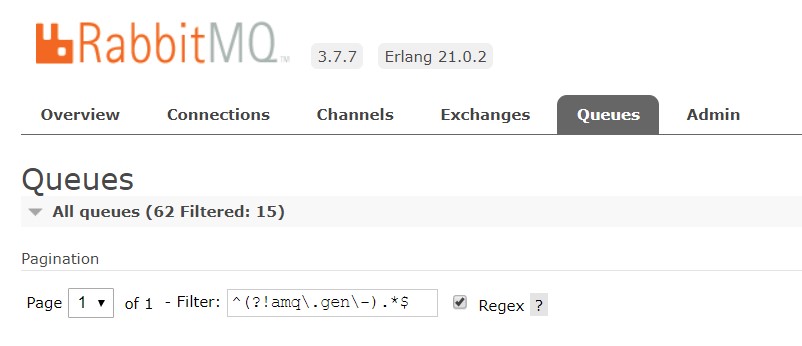
过滤以不显示amq.gen-xxx队列,刷新会保留过滤
^(?!amq\.gen\-).*$

error_page 405 =200 $uri;
使用–enable-gd 替代–with-gd
--with-gd becomes --enable-gd (whether to enable the extension at all) and --with-external-gd (to opt into using an external libgd, rather than the bundled one).