因为请求头部少了“Sec-Fetch-User: ?1”就不行了,可能和微信的安全机制有关
继续阅读分类目录归档:杂记
正则匹配所有字符(含换行符)
[\s\S]*
# 说明:空白字符+非空白字符等于全部字符您在运行该虚拟机时启用了侧通道缓解。侧通道缓解可增强安全性,但也会降低性能。
Scrapy入门教程
Composer Installation – Windows
Using the Installer#
This is the easiest way to get Composer set up on your machine.
Download and run Composer-Setup.exe. It will install the latest Composer version and set up your PATH so that you can call composer from any directory in your command line.
Note: Close your current terminal. Test usage with a new terminal: This is important since the PATH only gets loaded when the terminal starts.
Manual Installation#
Change to a directory on your PATH and run the installer following the Download page instructions to download composer.phar.
Create a new composer.bat file alongside composer.phar:
Using cmd.exe:
C:\bin> echo @php "%~dp0composer.phar" %*>composer.batUsing PowerShell:
PS C:\bin> Set-Content composer.bat '@php "%~dp0composer.phar" %*'Add the directory to your PATH environment variable if it isn’t already. For information on changing your PATH variable, please see this article and/or use your search engine of choice.
Close your current terminal. Test usage with a new terminal:
C:\Users\username>composer -V
Composer version 1.0.0 2016-01-10 20:34:53Windows添加自定义服务
sc create MySync binPath="D:\Downloads\syncthing-windows-amd64-v1.11.1\syncthing.exe" start=delayed-auto
Solr ik分词器集成
https://github.com/magese/ik-analyzer-solr
单机版Solr
-
将jar包放入Solr服务的
Jetty或Tomcat的webapp/WEB-INF/lib/目录下; -
将
resources目录下的5个配置文件放入solr服务的Jetty或Tomcat的webapp/WEB-INF/classes/目录下;① IKAnalyzer.cfg.xml ② ext.dic ③ stopword.dic ④ ik.conf ⑤ dynamicdic.txt
-
配置Solr的
managed-schema,添加ik分词器,示例如下;<!-- ik分词器 --> <fieldType name="text_ik" class="solr.TextField"> <analyzer type="index"> <tokenizer class="org.wltea.analyzer.lucene.IKTokenizerFactory" useSmart="false" conf="ik.conf"/> <filter class="solr.LowerCaseFilterFactory"/> </analyzer> <analyzer type="query"> <tokenizer class="org.wltea.analyzer.lucene.IKTokenizerFactory" useSmart="true" conf="ik.conf"/> <filter class="solr.LowerCaseFilterFactory"/> </analyzer> </fieldType>
-
启动Solr服务测试分词;

-
IKAnalyzer.cfg.xml配置文件说明:名称 类型 描述 默认 use_main_dict boolean 是否使用默认主词典 true ext_dict String 扩展词典文件名称,多个用分号隔开 ext.dic; ext_stopwords String 停用词典文件名称,多个用分号隔开 stopword.dic; -
ik.conf文件说明:files=dynamicdic.txt lastupdate=0
files为动态词典列表,可以设置多个词典表,用逗号进行分隔,默认动态词典表为dynamicdic.txt;lastupdate默认值为0,每次对动态词典表修改后请+1,不然不会将词典表中新的词语添加到内存中。lastupdate采用的是int类型,不支持时间戳,如果使用时间戳的朋友可以把源码中的int改成long即可;2018-08-23已将源码中lastUpdate改为long类型,现可以用时间戳了。
-
dynamicdic.txt为动态词典在此文件配置的词语不需重启服务即可加载进内存中。 以
#开头的词语视为注释,将不会加载到内存中。

汉字大全【UTF-8】
jdk-8u251-windows-x64.exe 迅雷 emule 下载
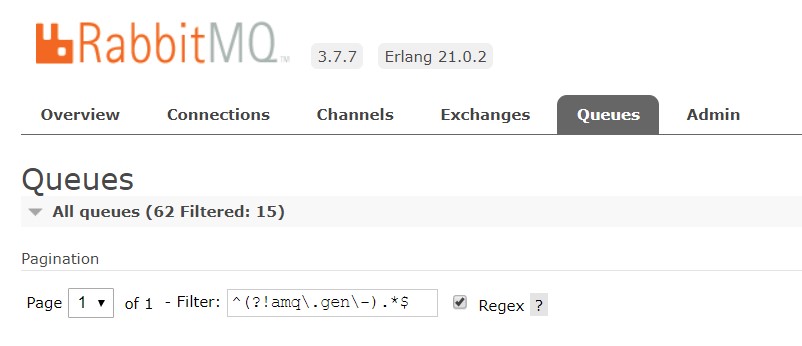
过滤以不显示amq.gen-xxx队列,刷新会保留过滤
过滤以不显示amq.gen-xxx队列,刷新会保留过滤
^(?!amq\.gen\-).*$