作者归档:杨龙
php pecl命令使用代理上网
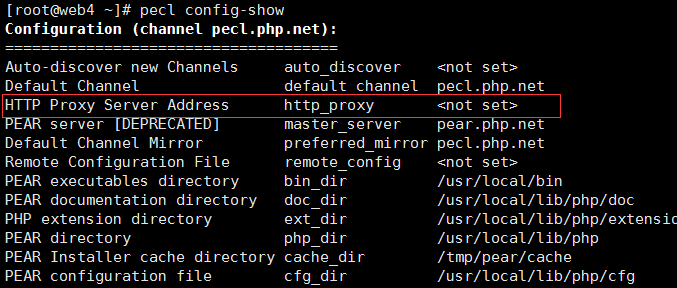
[root@web4 ~]# pecl config-set http_proxy http://test:1080
config-set (http_proxy, http://test:1080, user) failed, channel pecl.php.net
尝试失败
查找资料https://blog.flowl.info/2015/peclpear-behind-proxy-how-to/
换成pear成功。。。。
[root@web4 ~]# pear config-set http_proxy http://test:1080
config-set succeeded
这个应该是个bug pecl的代理要使用pear来设置。。。
nginx配置为http代理服务器
# 省略其他配置

http {
    # 省略其他配置

    server {
        # 可用的dns服务器地址
        resolver 10.143.22.118;
        # 监听端口
        listen 1080;
        location / {
            # 一般不需要修改
            proxy_pass http://$http_host$request_uri;
        }
    }
}
# 省略其他配置
ssh 免密码登录
ssh-keygen -t rsa -P ”
如何成为一个好的运维?
反思:
linux umount 时出现device is busy 的处理方法–fuser
事情是这样的:由于/目录磁盘空间不足,新建了个LVM分区,欲挂载在/home目录,于是尝试直接挂载,竟然挂载成功了,然而,/home目录下的数据却没了,数据应该没丢尝试取消挂载,但是提示device is busy,所以就用下面的方法恢复了
fuser -m -v -i -k /home && umount /dev/xxxx
原文地址:linux umount 时出现device is busy 的处理方法–fuser
当任何目录有 mount, 然后有程序使用/挂在那个目录上的话, 就没有办法 umount 掉, 於 umount 时会出现 Device is busy 的讯息.
要怎麼找出是哪个程序挂在那个目录上? 然后去把那个程式砍掉呢?
使用 fuser 的指令
那要怎麼找出是哪个程式挂在那个目录上?可以使用 fuser – identify processes using files or sockets
假设现在 mount 起来的目录是 /media/share
* 查询: fuser -m /media/share
* 显示: /media/share: 25023c
就代表是 process 25023(pid) 有使用到此目录, 后面 c 代表的意思可参考下述:
* c: current directory.
* e: executable being run.
* f: open file. f is omitted in default display mode.
* F: open file for writing. F is omitted in default display mode.
* r: root directory.
* m: mmap’ed file or shared library.
要把这个资源释放的话, 可以有下述做法:
* kill -9 25023 # ps aux | grep 25023 应该就会看到它
* fuser -m -v -i -k /media/share # 会问你是不是要把 25023 这个 kill 掉, 选 y 就会 kill 掉
提示信息如下:
USER PID ACCESS COMMAND
/meida/share: root 25023 ..c.. bash
Kill process 25023 ? (y/N) y
MongoDB索引

mongodb笔记:bin文件说明
bsondump 二进制导出
mongo 客户端
mongod 服务端
mongodump 整体数据库导出
mongoexport 导出人眼易识别的json文档或csv文档
mongofiles
mongorestore 数据库整体导入
mongos 路由器(分片使用)
mongotop 性能监控
log_queries_not_using_indexes 导致慢查询日志刷新太快
tail -f 查看慢查询日志的时候发现刷新很慢,而且时间不到一毫秒的查询也记录了,检查配置的时候发现设置的是2秒,以为没有生效,后来经朋友提示发现是开启了log_queries_not_using_indexes,记录没有使用索引的查询,关闭即可
set global log_queries_not_using_indexes = 'OFF';
Waiting for query cache lock
原文地址
http://250688049.blog.51cto.com/643101/1560425
Mysql InnoDB 引发 Waiting for query cache lock
标签:Mysql InnoDB Waiting
线上数据库中,如果是InnoDB的话,配备足够的innodb buffer pool后,就把query cache关闭掉(query_cache_size 和 query_cache_type 同时设置为 0),大量的更新+查询时,更容易引发 Waiting for query cache lock。
。。。
— show variables like ‘query_cache%’;
— set global query_cache_type=0;
— set global query_cache_size=0;
— show variables like ‘%slow%’;